
Why Does My Voice Sound Tinny Even With a Good Microphone?
Imagine this: You bought a good microphone for a few hundred bucks.
You expect to instantly sound like you are a famous radio announcer with a booming voice.
So why does your recorded voice still sound thin, tinny, nasal, or metallic instead of deep, warm, and rich?
Your microphone probably isn't the problem.
Your microphone is only one part of the recording chain.
Here are three things I would check before buying another one.
I record my voice every day for podcasts, reaction videos, and screen-recording lessons.
1 — Your recording software may be ruining the sound
This is the one that surprised me the most. But it makes total sense when you think about it.
Your microphone doesn't create the finished audio file.
The microphone captures your voice and sends that signal to your computer. Your recording software then has to record and preserve it.
And different recording software can produce noticeably different results.
Recording software may use noise suppression, automatic gain control, filtering, speech enhancement, compression, or other processing. Some software is designed primarily to make speech understandable, keep files manageable, or make recording reliable and easy.
That's not necessarily the same thing as preserving the full richness of your voice.
I discovered this myself by recording the same microphone with different software.
Same voice. Same microphone. Same computer. Different recording software.
And the difference was surprisingly large.
In the video above, I compare a cheap $25 microphone recorded with Canva's screen recorder and with Podsplice.
Listen especially to the body and depth of my voice.
The Canva one was very tinny and thin. The Podsplice recording was much better, even though the mic was still a cheap one.
This is one of the things my brother and I have focused on while building Podsplice. I don't just want software that successfully records your microphone.
I want the finished recording to actually sound great.
Note: I have since upgraded to the Shure MV7+, and you can hear that in the video above. It is what I'm using to record the narration of that video. So the Shure mic plus Podsplice is an awesome combo for recording both screen recording or 2-person remote podcasts.
I recommend watching that video with headphones so you can hear the audio quality and evaluate it for yourself. Computer or phone speakers don't do it justice.
2 — You're too far away from your microphone
Before buying another microphone, try something incredibly simple:
Move closer.
With many directional microphones, getting very close creates a proximity effect that boosts the lower frequencies relative to the rest of your voice.
The result is a voice that can sound deeper, warmer, fuller, and more powerful.
This is one reason you often see radio hosts and podcasters speaking only a few inches from their microphones.
Getting closer also makes your voice louder compared with sounds farther away in the room. That can mean less room echo, computer fan noise, HVAC noise, and other garbage in your recording.
Just don't get ridiculously close.
Too much proximity effect can make your voice boomy or muddy, while P and B sounds can create unpleasant blasts of air called plosives.
A few inches away is a good place to start experimenting.
Note: Wear headphones that are plugged directly into your mic while you record. This is huge.
You will get live feedback about how your voice actually sounds. Then you'll know how close to the mic you should be. If you don't wear headphones while you are recording, you won't have any idea how your voice will sound in the final recording, and you won't have any idea how close to the mic you should be to get the sound that you want.
3 — Your recording may be losing some of the frequencies that make your voice sound full
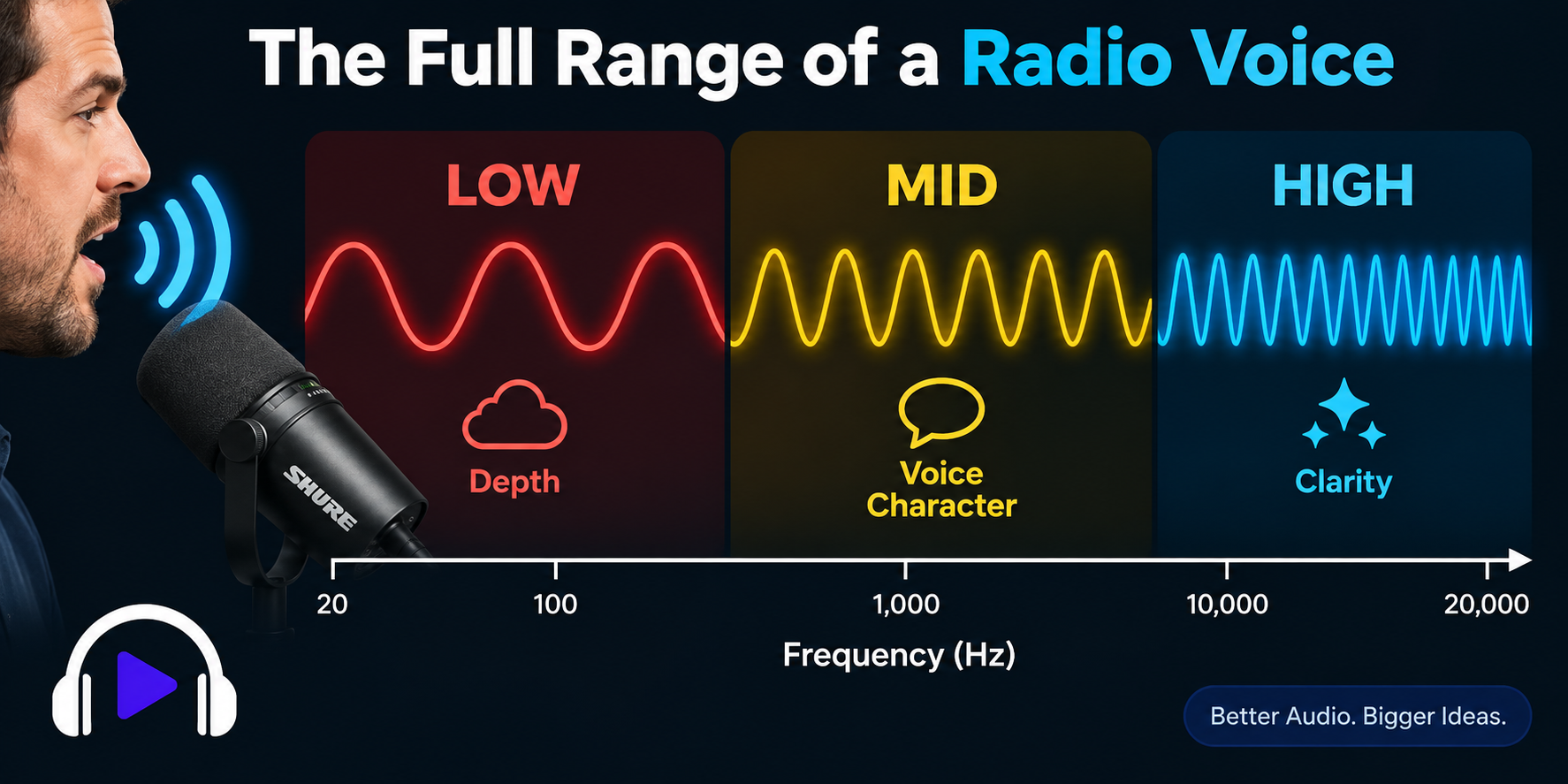
Your natural voice contains a huge mixture of frequencies.
Very roughly, you can think about them like this:
Low frequencies = depth, body, and warmth
Middle frequencies = the core character of your voice
High frequencies = clarity, detail, and crispness

The important thing is that those lower frequencies are already part of your voice.
Your microphone may even be capturing them perfectly well.
But somewhere between your microphone and the finished recording, some of that low-frequency energy can be reduced or altered.
Recording software can apply filtering, noise suppression, voice enhancement, automatic processing, or compression. Depending on how the software handles your audio, the finished recording may not have the same balance of frequencies that originally entered your microphone.
And when too much of that lower-frequency body is lost while plenty of the mids and highs remain, your voice can start sounding thin, tinny, nasal, or overly bright.
That's why changing microphones doesn't always fix the problem, especially if you are already using a decent mic.
Often your microphone captured exactly what you wanted.
The recording software just didn't preserve it the way you expected.
Before You Buy Another Microphone...
If you already own a decent microphone but don't like how your recorded voice sounds, try these three things first:
Try different recording software like Podsplice.
Move closer to your microphone.
Make sure your finished recording is preserving the warmth and body of your voice, not just the mids and highs.
A better microphone can certainly improve your audio.
But don't assume the microphone is the problem just because the finished recording sounds bad.
Your voice has to travel through an entire recording chain before it reaches your listeners.
And sometimes the microphone is doing its job perfectly well.
The problem is what happens after your voice reaches it.
If you're recording podcasts, reaction videos, tutorials, online courses, or screen recordings, you can use Podsplice directly in your browser.
We have hundreds of customers who are using Podsplice every day. We get emails from them telling us how easy it is to use and how much they love the quality.
About the Author
Andrew Best
Andrew Best is an entrepreneur, educator, and AI expert with over two decades in online marketing. He co-founded China232 — a podcast and learning platform with 10M+ downloads — and later 88Herbs, a premium supplement company. Andrew now focuses on helping creators leverage AI for podcasting, screen recording, and YouTube content through Podsplice.
More from Podsplice
Screen Recording Software for Shopify: The Easiest Way to Get Free Organic Traffic & Sales
Article
How Mortgage Brokers Can Get Clients With Animated YouTube Videos (Human + AI)
Article
Send Podsplice transcripts to Notion
Article
How to Record an Online Coaching Call (Easy + High Quality)
Article
How to Create Social Media Videos as a Team
Article
Start Recording in Seconds
No downloads. No setup. Just hit record and share your story with the world in studio quality.
Looking for a Screen Recorder or Remote Recording tool?