
Best Browser-Based OBS Alternative in 2026 (No Download Needed)
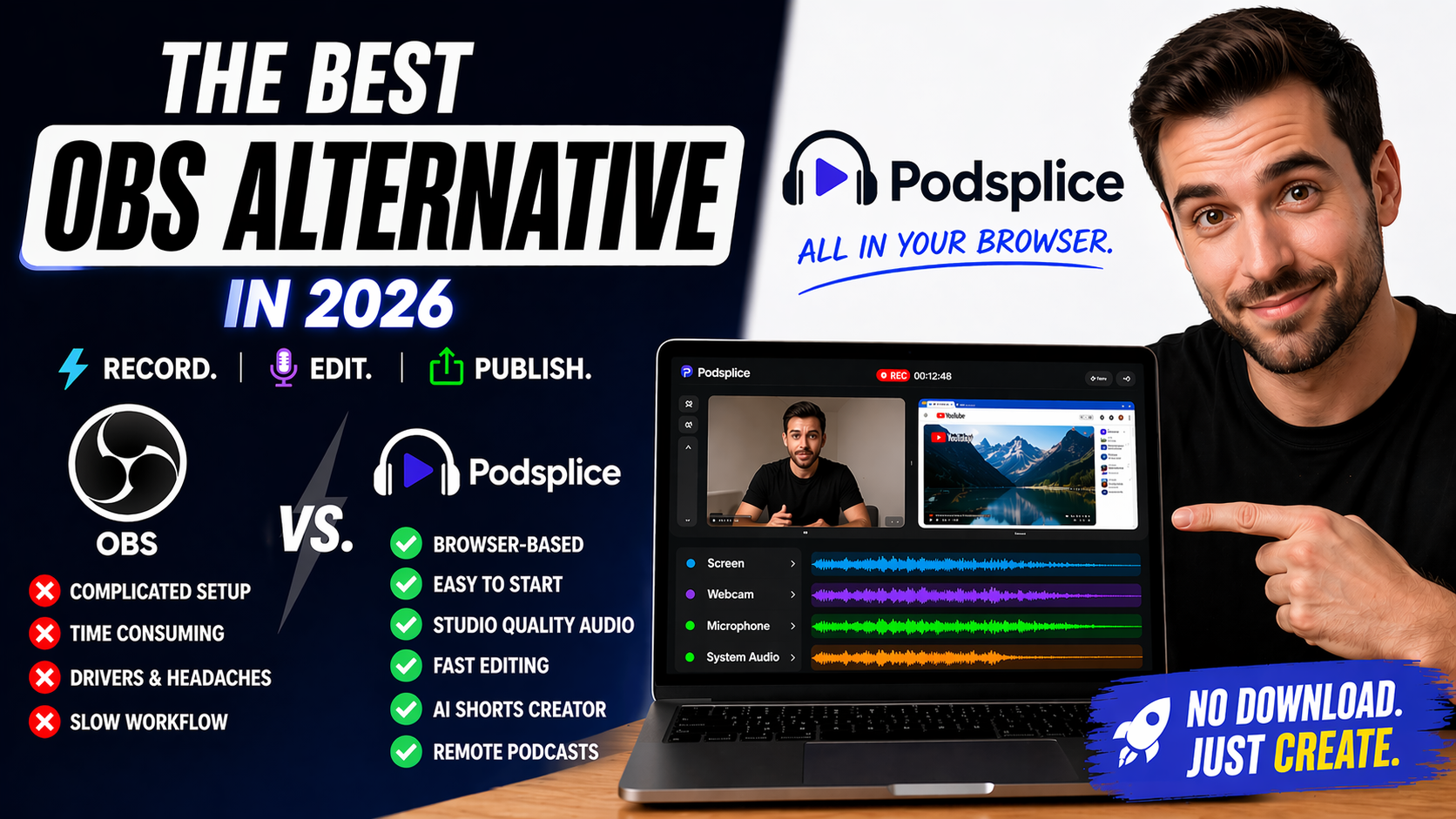
If you've searched for a browser-based OBS alternative, there's a good chance you're feeling one of two things: OBS looks powerful but exhausting, or you just want to hit record and make content.
OBS is powerful, free, and used by serious streamers around the world.
But for many creators in 2026, it can be far more than they actually need — and far more than they bargained for on a Tuesday afternoon when they just want to post something.
As a content creator myself, I personally find OBS too frustrating to use, and I know I'm not alone. I want to create high-quality content quickly and easily, not fiddle around with OBS and the super complicated setup that stresses me out and slows me down.
Creators want to record a video, not spend their afternoon fixing audio settings.
If your goal is to record videos quickly, publish consistently, and skip the technical friction, the best browser-based OBS alternative is Podsplice. It runs entirely in your browser, captures studio-quality audio and 4K video, and gets out of your way so you can create.
Quick Answer: What Is the Best Browser-Based OBS Alternative?
Podsplice. It lets you record your screen, webcam, microphone, and system audio — all as separate synced tracks — directly in your browser with no download required. For creators who measure success in videos published rather than settings configured, it's the right tool for 2026.
Why People Search for an OBS Alternative
OBS is genuinely powerful software, and that's also part of the problem.
Its interface was built for live production control rooms, not for creators who want to make courses, reaction videos, remote podcasts, shorts, etc. Common OBS pain points include confusing scene and source architecture, audio routing that requires near-professional knowledge to get right, system audio that refuses to work on Mac without third-party drivers, and a setup process that can eat an entire afternoon before a single second of footage is recorded.
For advanced streamers who need multi-camera switching and real-time scene transitions, that depth is a feature. For a YouTuber making reaction videos or a course creator recording software walkthroughs, it's a tax on every single recording session.
For many everyday creators, OBS can feel like bringing a television truck to film a bicycle race.
A good friend of mine is an OBS expert and knows how to use every feature. And even he hates using it and now uses Podsplice for his content creation.
The Hidden Problem Most Screen Recorders Share
Before explaining why Podsplice stands out, it's worth understanding what most screen recorders — including OBS in a typical setup — actually do to your audio.
When software captures your microphone and your system audio and combines them into a single file, it automatically lowers the volume of both sources to prevent distortion. The result is a recording where your voice and content audio compete with each other instead of sounding clean and balanced.
Podsplice doesn't give you one messy file.
It gives you four clean, separate tracks:
screen
webcam video
microphone audio
system audio
Because they're isolated, each source is recorded cleanly and can be adjusted independently later. You can lower the YouTube video volume without touching your voice, or export everything together when you're ready to publish.
Why Podsplice Stands Out
Audio Quality That Matches What Your Microphone Can Actually Do
Most creators buy a better microphone but still record through software that bottlenecks the result.
Podsplice is built for creator-grade audio quality, helping your voice sound fuller, clearer, and more professional without needing a technical setup.
System Audio That Actually Works on Mac
This is the feature that trips up more creators than anything else.
Most screen recording software doesn't capture system audio at all — the sound coming from your computer, like the sound coming from a YouTube video you are reacting to during a reaction video.
And on Mac, getting that audio has historically required virtual drivers like BlackHole or Soundflower, plus extra setup and troubleshooting.
Podsplice captures your microphone and system audio natively in the browser. You hit record, and it works. No drivers, no drama.
Better Sync on Long Recordings
Many creators have experienced audio slowly drifting out of sync on longer recordings.
Podsplice is designed for stable browser-native recording, helping keep your audio and video aligned from the start.
Shorts-Ready Without Extra Editing
Because Podsplice records your webcam and screen on separate 4K tracks, you're not stuck with a fixed layout.
Podsplice has a built-in shorts creator that can automatically flip your horizontal recording into a vertical stacked layout — face on top, screen on the bottom — ready for TikTok, YouTube shorts, or Instagram Reels. Podsplice also puts in karaoke subtitles that look great and keep people watching.
For creators who publish on multiple platforms, that alone saves hours every week.
Works on Every Device, Instantly
A browser-native recorder works identically on Mac, Windows, or Chromebook. No admin password, no compatibility issues, no version mismatches.
You open a browser, log in, and record.
The Real Cost of the "Free" Tool
OBS is free to download. That genuinely matters.
But free tools can still be expensive in other ways — in time, momentum, patience, and consistency.
A 10-minute video with a traditional setup can easily become 10 minutes of recording, 15 minutes of troubleshooting, 20 minutes of editing fixes, and extra time exporting.
The same video in Podsplice is 10 minutes of recording and a couple of minutes to trim and upload.
When you publish twice a week, that difference compounds fast. Creators who move faster tend to grow faster.
Try Podsplice and see how fast recording can feel.
Podsplice vs. OBS: The Honest Comparison
OBS gives you maximum control. Podsplice gives you maximum momentum.
OBS is stronger for complex livestream scenes, heavy overlays, multi-camera switching, and deep technical production environments. If you're a power user who loves that level of customization, OBS has absolutely earned its reputation.
Podsplice is stronger for creators who want to record professional-quality content quickly — studio audio, 4K video, separate tracks, system audio on Mac and PC — without a download or a setup guide.
This isn't about attacking OBS. It's about choosing the right tool for the job.
| Feature | Podsplice | OBS Studio |
|---|---|---|
| Browser-based (runs in browser) | ✅ Yes | ❌ No |
| Mac support | ✅ Yes | ✅ Yes |
| Windows support | ✅ Yes | ✅ Yes |
| Chromebook support | ✅ Yes | ❌ No |
| Setup style | ✅ No download, no drivers | Download + install required |
| Easy to start recording | ✅ Easy | More difficult for many users |
| Screen + webcam + mic | ✅ Yes | ✅ Yes |
| System audio capture | ✅ Yes | ✅ Yes (setup can vary) |
| Fast editing / publish workflow | ✅ Strong | More manual workflow |
| Remote podcast recording | ✅ Built-in | ❌ No built-in |
| AI shorts creator | ✅ Yes | ❌ No |
| Separate tracks | ✅ Yes | ✅ Yes |
| Advanced livestream setups | Basic / moderate | ✅ Excellent |
Who Should Use Podsplice
Podsplice fits creators who want to record great content and move on. That includes YouTubers making tutorials or reaction videos, course creators who need clean voice-and-screen recordings, remote podcasters who want locally recorded studio quality without complex setups, affiliate marketers and founders making product demos, and anyone who has lost an afternoon to OBS troubleshooting and decided there had to be a better way.
In 2026, the best software isn't the one with the most buttons. It's the one that disappears.
Final Verdict
If you need a broadcasting control room with real-time scene switching and deep production customization, OBS Studio remains the standard.
If you want to record professional-quality content — studio audio, 4K video, separate tracks, system audio that actually works — without downloading anything or reading a setup guide, Podsplice is the best browser-based OBS alternative in 2026.
For most creators, simpler wins.
Try Podsplice and start recording directly in your browser.

About the Author
Andrew Best
Andrew Best is an entrepreneur, educator, and AI expert with over two decades in online marketing. He co-founded China232 — a podcast and learning platform with 10M+ downloads — and later 88Herbs, a premium supplement company. Andrew now focuses on helping creators leverage AI for podcasting, screen recording, and YouTube content through Podsplice.
More from Podsplice
Why Your Screen Recordings Look Blurry (And How to Fix It)
Article
Why Most Screen Recording Software Is Terrible for YouTube Videos (And What Creators Actually Need)
Article
How to Record a Reaction Video with System Audio
Article
How to Get Real Estate Leads From YouTube (Step-by-Step)
Article
Send Podsplice transcripts to Notion
Article
Start Recording in Seconds
No downloads. No setup. Just hit record and share your story with the world in studio quality.
Looking for a Screen Recorder or Remote Recording tool?