
Easiest Way to Earn Money from Affiliate Marketing in 2026 (Faceless Screen Recording Videos)
I've been doing SEO and affiliate marketing since 2002.
I used to get most of my results from writing articles on WordPress sites.
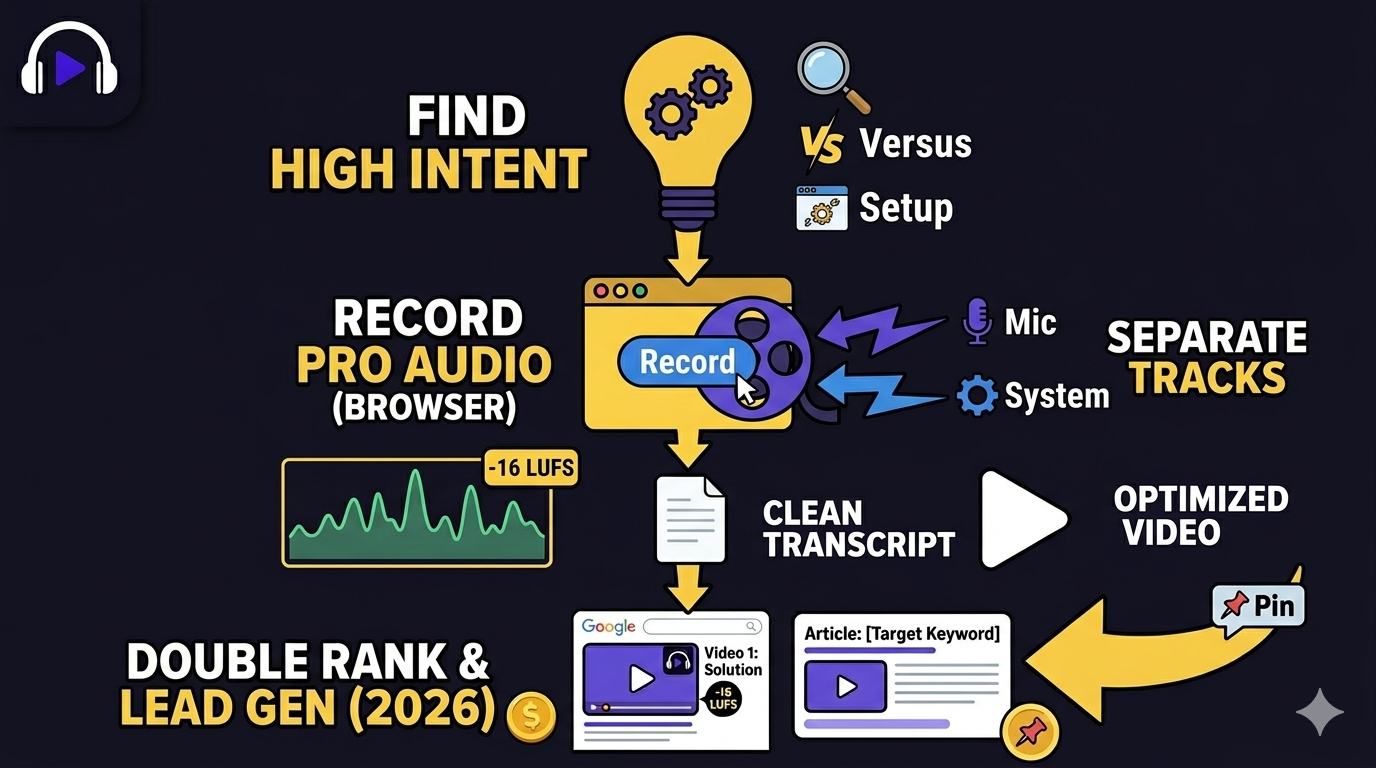
In 2026, the easiest way to earn affiliate income is by making faceless screen recording YouTube videos.
Here are a few things to consider when making faceless YouTube videos for affiliate marketing
1. YouTube Videos are Showing up in Google Search like Crazy
I've noticed the same thing, but I just got this chart from one of my favorite SEO guys, Edward Sturm.
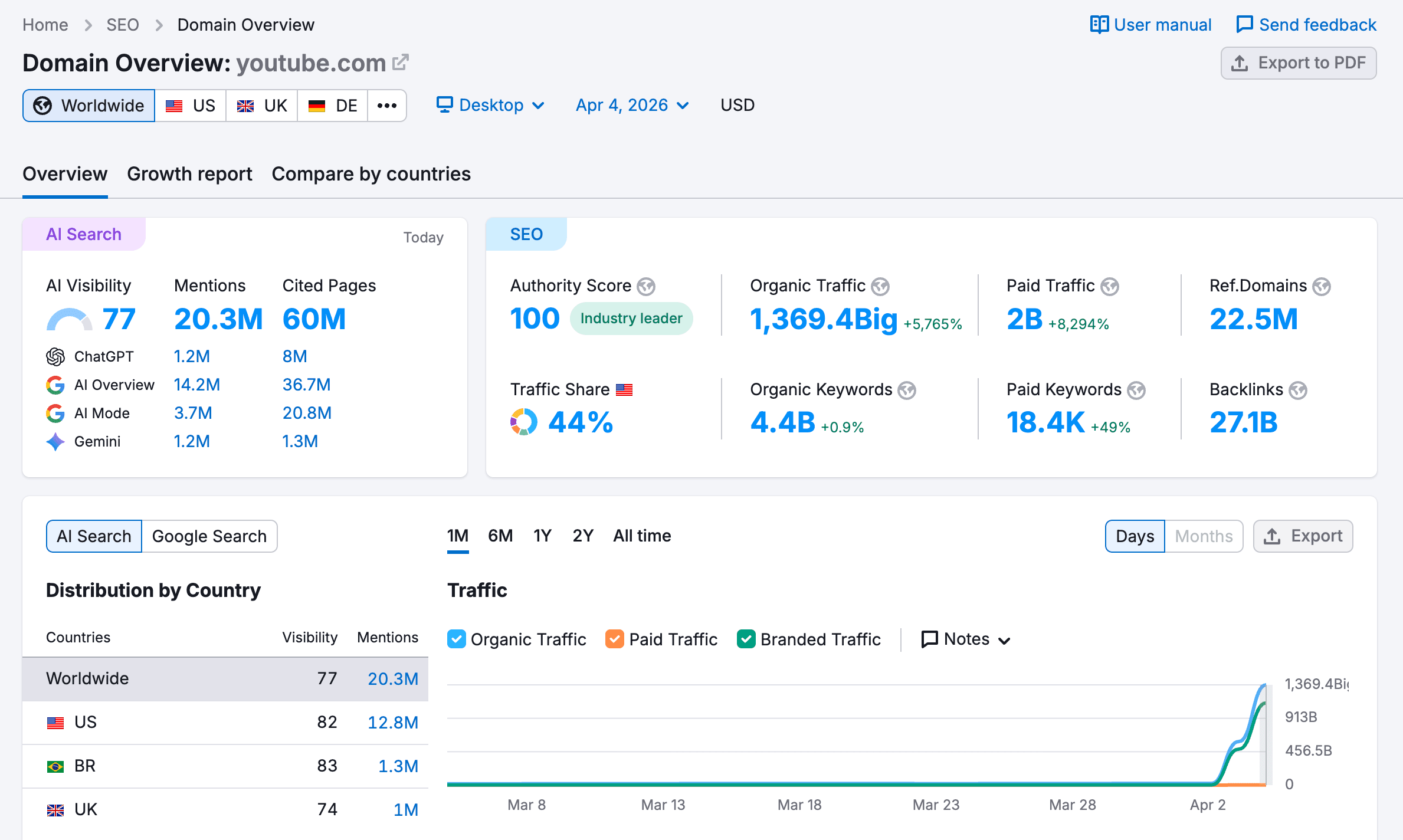
I think this trend will continue. AI slop is a huge and growing problem for Google. It's so easy to pump out thousands (or more) articles with AI. It's possible to do this with video as well, but YouTube can ban AI slop videos easily. Also, since Google and YouTube are owned by the same company, Google gets more audience data about how videos perform.
This is why I recommend using your own voice when recording your faceless videos. It builds more trust than using AI voices.
2. Target "High-Purchase-Intent" Searches
Most creators chase "viral" views. Smart marketers chase intent. To make money, stop making generic content and start making search-driven tutorials:
The "How-To": "How to set up a Shopify store in 10 minutes."
The "Versus": "Podsplice vs. Loom: Which is better for tutorials?"
The "Fix": "How to solve [Software Name] connection error."
When you solve a technical headache, you aren't "selling"—you’re helping. The viewer will naturally click your affiliate link to use the tool you just demonstrated.
Don't worry about how many views your videos get. You will sell almost nothing if people find your videos when they are scrolling.
But you can sell a lot if they find your video when they perform a specific Google search.
I'll give an example of what is working well with me.
I made this video about how to screen record on a Mac with internal audio
It's obviously not a video that will get a ton of views and has zero potential to go viral.
But it brings in sales because it solves a pain point.
In this case, I'm recommending Podsplice, which is the software that we're promoting here, so it's not an affiliate link because I own the software.
But if I were recommending another software from a different company, I'd just put my affiliate link in the YouTube description. The process is identical
3. The "Stream-of-Consciousness" + AI SEO Hack
Google and AI models (LLMs) now "read" video descriptions to provide search answers. To rank, you need text data. * The Trick: Before you upload, record a 60-second "stream-of-consciousness" summary of your video. Don't even worry about cleaning it up.
Then take that text and put it into ChatGPT, Gemini, or Claude to write a YouTube description based on that input. You can include a few of your ideal keywords if you want to get more specific.
Put your affiliate link near the beginning of the description and in the first "pinned" comment.
4. Which Software Should I Use to Make Faceless YouTube Screen Recording Videos
In affiliate marketing, consistency is the only shortcut. If your setup is a hassle, you will quit. Podsplice was designed specifically for this high-speed workflow:
No Downloads: It is entirely browser-based. You don’t need to worry about drivers or installation. You can record a tutorial the moment you find a new keyword.
Separate Tracks: It records your mic and system audio on different tracks. This is huge—it allows you to swap voice-overs or edit out mistakes without having to re-record the entire screen.
Read how to choose a screen recording software for creators.
Your 2026 Action Plan:
Research: Find a specific software problem people are searching for and get an affiliate link from that company.
Record: Open a tab, use Podsplice, and show the solution.
Optimize: Paste a detailed text summary in the YouTube description for SEO and AI citations.
Monetize: Drop your affiliate link at the very top of the description.
Bonus: Write an article with your affiliate link based on your YouTube transcript. Put your video in the article body.
Podsplice also records awesome remote podcasts. Look at this podcast we made with Podsplice that talks about how to write an article based on your YouTube transcript.

About the Author
Andrew Best
Andrew Best is an entrepreneur, educator, and AI expert with over two decades in online marketing. He co-founded China232 — a podcast and learning platform with 10M+ downloads — and later 88Herbs, a premium supplement company. Andrew now focuses on helping creators leverage AI for podcasting, screen recording, and YouTube content through Podsplice.
More from Podsplice
Mastering the Podsplice Multi-Track Video Editor
Article
Why Does My Voice Sound Tinny Even With a Good Microphone?
Blog
Creating High-Quality Faceless Videos
Article
The Best Video Format for Affiliate Marketing YouTube Videos in 2026: The "Talking Head" Edge
Blog
Understanding Directional, Dynamic, and Condenser Microphones for Podcasting
Article
Start Recording in Seconds
No downloads. No setup. Just hit record and share your story with the world in studio quality.
Looking for a Screen Recorder or Remote Recording tool?